Showing posts sorted by relevance for query visual web. Sort by date Show all posts

Friday, January 03, 2014

Image Optimisation: Importance of Alt Text


Image optimisation for local strategies on the visual web
Importance of image optimisation in local strategy
Alt text is 'alternative text' - the text inside the alt tags  alt=""  "alt text".
Also called The Alt Attribute.
The value of the alt attribute is an author-defined text


The alt text serves as an alternative text on a webpage to describe an image content; which cannot be easily interpreted by search engines / Google.

The Visual Web in Local Search Results

The alt text is good for the user journey and therefore good for Search Engine Optimisation (SEO). In this increasing time of the 'visual web', where images outrank words for engagement, where 5% of all search is image related, 10% of all searches are via Google Image search, where images show up on maps in local searches, on Panoramio and Google Earth, on local search 'carousel' for locations frequently mentioned on the web like museums etc, where photo posts on Facebook get 39% more interaction and one of the most popular activities on G+ is the upload and sharing of images and tweets with images have a better chance of being retweeted, where 16 billion photos have been shared on Instagram, where Pinterest image pins deliver on average two site visits and six pageviews...then it makes sense to add some helpful details to images. Image alt text in turn helps to make the web content meet W3C web standards for accessibility - to ensure web access is available to people whether or not they have impairments of one sort or another.

Image Optimisation
If you imagine a website visitor is reading a web page on a screen reader; the visitor will learn what is on the page from a number of triggers, such as the keyword rich URL, the page title / title tag and the header title / header tags. These tags are used to optimise a web page and therefore give an indication to the visitor and the search engines about what the page content will contain; the body text holds most of the page content detail.

An image is a more attractive, emotional and memorable way of telling the story within the page and body text. However, the search engines need a written description about the image content and the image location to outline what role, or relevance the image has on the page. Ideally, the alt text would be a short, seamless piece of text that is part of the body text. We do not actually have to describe in detail what is in the picture. It is more important to reference what is in the image, or to describe the scene within the picture, as if it is part of the sentence before and part of the sentence after the image. This way, the image is explained 'in context' to the rest of the copy.

Logo Optimisation
If the image has no contextual purpose on the page, like a logo in the header for instance, then it is acceptable to leave the alt text blank, as the user journey is not enhanced by knowing the logo is there and the image name would have already identified it as a logo. In some circumstances, logo optimisation can be used if the logo design also incorporates a strap line, or a geographical location, rather than just a graphic logo design.

Image Ranking Factors
An optimised image at the top of the page naturally gives the search engines another trigger to understand what is on the page. Being above the fold gives the image some SEO prominence and makes the page visually appealing. Google determines that these tags are of benefit for the end user, in making their journey around the website as easy as possible, therefore Google will rank a website based on the optimised content.

As with all the optimisation tags used on a web page, the alt text, (sometimes incorrectly call alt tags) allows for some of the competitive topic keywords to be used, these can also be geo-located if it is relevant to the context of the page. It is imperative that no keyword stuffing is used; this is considered spamming and obviously does nothing for the user's journey.

Alt Text and Captions
As a guideline, the recommended maximum length of alt text is 125 characters. It is recommended not to embed important text in images because as mentioned, the search engines need to know what is in the image. Captions and title can be used to help describe the image but these do not always show on a mobile, whereas the alt text will work in all situations.

Google Search by Image
We used to say that Google was blind when it came to images but that has all changed. The Google  'search by image' features a camera in the image search box which allows users to do a reverse image search and discover all sorts of content that's related to a specific image..

Using the local image optimisation symbol above, we dragged the Jpeg in to the Google image search box. Google tries to interpret the image and return visually similar images.
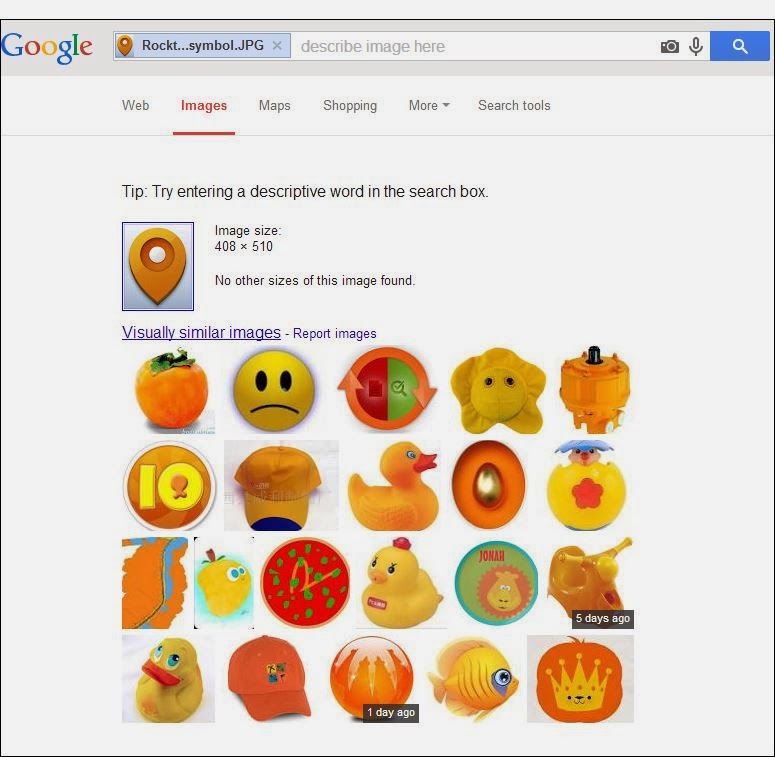
Google interprets the image content and returns visually similar images
Drag an image into an image search and Google interprets the image content

Some images are more easily interpreted than others and Google will return webpages with a similar image; it may be the same image but the size differs on different webpages, such as the Keytek Locksmith Engineer image below.

Google image search interprets image content
Google improves image search and interprets image content to match to web pages with similar images

Impressively, Google Image search is able to match some image content quite accurately. The Southern Contracts News article image example below was interpreted as a UK Map.

Google Image Search matched the UK map image
Google can interpret and match some images quite well

Google is increasingly improving how it clusters multiple images, how it identifies duplicate images, determines which image makes the most sense. Image ranking is performed on many signals but giving the search engines as much detail as possible about the image is certainly worthwhile; each image is an important link back to the website hosting that image.

Image Optimisation Developments
The value associated with image optimisation and geo-locating images is always changing. In 2012 we were trying to get our clients to seriously think about image optimisation and how to use tools like Picasa to manage their images; now it seems very natural for businesses to embrace image optimisation.

Give us a call if you want to discuss our approach to image optimisation, prioritising the best image for image search via responsive design, image-specific tags for image sitemaps in webmaster tools, image scaling for apps, adaptive images, cross-browser, using CSS, appropriate image file sizes for your requesting devices, schema.org image markup, rich snippets, geo-targeting, image search reporting in analytics, accurate image resolution for smartphones or any other consideration you may have for using images to increase web traffic.

Author: Fiona Anderson

Wednesday, August 01, 2012

Picasa, Blogger, image optimisation and SEO


a variety of RocktimeSocial blog images saved in Picasa


Rocktime has talked previously about Picasa as a photo sharing platform ‘Photosharing: Flickr versus Picasa’, in extension to that post, we would like to contribute some knowledge with regards to how Picasa integrates with your blogger account. Reason being, when using Blogger as your blogging platform, as we do here at Rocktime, you may not realise it but every image you upload through blogger goes onto your Picasa Web account.

With any free photo sharing web account, like Picasa, it is worth making sure about storage capacity. Picasa Web Albums offer a 1GB size limit, however, the additional charges for Google storage are fairly minimal. Not every single image you upload contributes to the total storage; images under a certain size will not count towards your 1GB limit. Furthermore, having a Google+ account will actually increase what you can upload for free, without taking it out of your 1GB limit. Google+ offers unlimited storage for photos uploaded in Google+, which are automatically resized to 2048 pixels. Videos up to 15 minutes in length are also free. G+ is almost turning into an image archiving facility.

An alternative is to use your own image hosting, uploading images to your domain, or using another online image hosting service, and then direct linking to the image through your blog post.

If you want to conserve space on your Picasa Web Albums account, another thing to look out for  is to manage duplicate images, which is an issue that sometimes crops up when uploading images to Picasa from your PC.

This is due to the way Picasa scans your computer for images; if you have the same image stored in a different file, Picasa might choose to treat it as two separate images. If you’re making use of the Import button to bring photos from your computer into Picasa, check the ‘Exclude Duplicates’ option at the bottom of the page. This will force Picasa to check for duplicate entries by comparing factors such as size and names etc, and hopefully remove the likelihood of any copies of images being uploaded.

Last year Google wrote some recommendations for improvement with the Google Picasa and Blogger integration which links to the Google Picasa Help Forum if more assistance is needed.

There are many other features from Picasa that help to keep a blog engaging, such as fast Picasa Web photo viewer, manager and uploader for Android devices - called Picasa Mobile -, which was designed to facilitate viewing and managing your online Picasa albums and photos.

Google Picasa Web Albums recently added a range of new image editing effects like Boarders, Vignette, Duo-tone, and more effects similar to editing in Adobe Photoshop, Irfan view and PaintNet photo editing software, which helps to make the photos look more professional.

There are numerous SEO advantages of optimising images in Picasa, like the ability to geo tag images, which adds geo-location details to help your local search engine rankings, high-quality backlinks pointing to your website, better page load time from reduced bandwidth and storage reduction, good search engine presence for your images, a library of images that can be shared socially, and you can even embed Slideshows in blog post from Picasa.

One feature that should never be overlooked with any images is the actual image optimisation process. We will write a more detailed brief on this in the coming weeks. Generally though, the rule of thumb is to make sure that the image is named accurately, that the image contains some of the keywords relevant to the blog or content of the article and that Google is given all the contextual and any localisation details about the image. This way, the chance of the image being found on Google Images is greatly improved. Every image on Google Images is a possible link back to a website and helpful to users. All good for user journey, mobile viewing, relevant content, sharing opportunities and SEO.  This can all be done in Picasa before uploading the image. Picasa allows that image to be shared in a number of ways, which is great for running marketing campaigns.

Once the images are uploaded to the blogger blog, it takes just a few moments to go into the HTML or right click the image in 'compose' mode and add the alt text for the image. Alt text, or alternative text of an image, tells the user about the image depending on the context in which the image is used.  Alt is not a tag, or a place to stuff keywords, it is an 'attribute'. Basically, search engines cannot crawl images, they index the text part attached with it, so the alt text is an alternative for non-visual browsers.
Images play a massive role in mobile, directories, user reviews, blogger engagement, social networks, websites, press coverage and organic inbound marketing link building campaigns.

If you’re interested in learning more about Google updates, services or how Rocktime helps businesses to use image optimisation as part of good practice for SEO, Accessibility and an Integrated Digital Marketing Strategy, then please ask one of our Flashlight Search Marketing Team  about publishing your content to a larger audience, it is something we are passionate about and have been talking to our clients about for the last 2 or 3 years. Check out the blog we wrote back in 2010 about Good practice on adding images to Blogs.

Please get in touch with Rocktime Sales Team to arrange a meeting or leave us a comment below about how image optimisation can make a difference.


Author: Fiona Anderson

Saturday, May 31, 2014

Some Pros and Cons of Display Advertising


Google has a well established display advertising offer
Google Display Advertising

As part of a businesses digital transformation, it is likely that a business will want to consider whether or not to use ‘display advertising’ in AdWords. We have outlined some quick pros and cons of display advertising to assist a business with the decision making.

The business would need to do some restructuring of the AdWords account.
Budget would be required, either additional budget be assigned, or diverted from existing campaigns.
A web developer would need to add some additional tracking code to the website.

The primary use of display advertising and not just in AdWords, has generally be considered for Brand building, although some businesses do manage to make display advertising drive leads and sales, where Brand building is a positive side-effect.

Display ads have an incredibly low engagement rate: the average banner ad has a 0.1% click through rate (CTR) and the standard 468x60 banner has a 0.04% CTR

The key to making display advertising cost effect and gaining a decent ROI/be profitable, a business
would need to:
1.    optimise every single part of the online conversion funnel
2.    place ads on websites your target market visits
3.    design optimised ads that relate to the content on those sites
4.    the message, and especially the headline, is a vital component in successful display advertising
5.    ‘message match’ - when visitors are instantly reaffirmed that they can get what they came for – because the headline matches the link (or ad) they came from – they are more likely to remain on the landing page
6.    poor message match will produce a higher bounce rate which is interpreted by Google as a poor user experience. The stronger your message match is, the better the user experience is – making the account history more positive, in turn lowering the costs
7.    the display ad has a graphical component to it, which needs to follow the design of the ad through to the landing page
8.    develop landing pages that align with the ads and the websites they're placed on
9.    A focused landing page, on the other hand, has an attention ratio of 1:1. (whereas, if the visitor is sent to the homepage we could expect that this would typically be around 40:1 meaning that there are 19 distracting actions and 1 desired action – hence needing a focused landing page).

Display advertising has always been considered ‘tough’. The debate continues in the industry as some speculate that there are up to 54% of online display ads “never even seen”.
Some of the wastage can be attributed to the user’s journey:
•    technical glitches, such as when an ad is displayed on a part of a browser not open on a computer screen
•    user habits
•    users not scrolling below the fold
•    users clicking away before the ad can load
•    and even outright fraud based on fake traffic

The overall stats for paying attention to any kind of advert is 6% - 8% (if the stats can be believed)
There are businesses that get some better results by making their ads interactive and rich media display formats.

In conclusion:
If a business's’s Key Performance Indicator (KPI) is awareness, then display advertising is one of the channels that business could consider using.

If a business is still in the early stages of currently trying to determine audience and message via PPC, reviewing their Google analytics reporting, especially Demographics and Interest Reports and testing which ads work, then it is worth noting that display advertising is even more challenging if audience and message are not already established.

PS
If the above doesn’t convince you then maybe these 2 negative 'tongue-in-cheek' quotes/stats will:
  • You are more likely to complete NAVY SEAL training than click a banner ad.
  • The average person is served over 1,700 banner ads per month. Do you remember any?
On the other hand, this recent quote from Econsultancy about Display Retargeting could be a tempting way into display advertising
  • Display retargeting tags are present on 52% of the top 2,000 UK websites and 48% of the top US websites. 
There are pros and cons but it is worth considering, if only for the following 2 reasons:
  • Display advertising in UK accounted for 30% of spend in 2013, similar to previous years.
  • Rich media images, animation and video are often more attractive to a user than static text and form part of the increasing 'visual web'.

We hope this helps answer some of your display advertising queries, compiled with thanks to some well known comments by industry experts on display advertising. We look forward to hearing from you on whether your business would like to pursue Display Advertising as a online marketing channel.


Author: Fiona Anderson

Wednesday, February 12, 2014

Top Ten Tips for Facebook Pages

Top Ten Tips for setting up a Facebook Company Page
Facebook has 1.19 billion monthly active users

We are regularly asked for tips for optimising a Facebook Company page. Here are just a few to get you started...but mostly it is all about engagement strategies.

Top Ten Tips for setting up a Facebook Company Page

1. Know who you want to connect with, what and why you are looking to connect on Facebook.  Define your goals. Develop a strategy to listen and search. 


2. Choose a suitable cover image. First impressions count. Feature Call to Actions just below the cover image. Image dimensions 851px wide x 315px tall.


3. Highlight posts and publish more than once a day. Remember visual content rules on Facebook. Photo posts get 39% more interaction. Reply to comments.


4. Give focus to building your page and to optimise for Facebook Graph Search, make sure your basics are complete (Category, web address, about section, local place page, address). Tag and geo-locate content.


5. It’s not about the number of likes. The metric that matters is the number of people engaging with your Facebook page. Manage page permissions - can people like, comment, share. The average number of minutes users spend on Facebook mobile is 914 minutes.


6. Share your milestones (key dates) and post effective engaging updates, like question, quotes, competitions. Engagement rates are high on Thursday and Friday and highest on the weekend. Posts at 1pm get the most shares and posts at 3pm gets the most clicks. 


7. Use the tools within Facebook, Apps, Highlighting posts, Schedule Posts in the activity log, Personalisation for Custom audiences, Search, watch other pages, get ratings and recommendations.


8. Don’t forget about the opportunities offered by Facebook Adverts and Promoted Posts.


9. People discover more content from the people they know and pages they like. Consider which posts get shared. Add quality articles over memes. Track, measure and tweak.


10. Cross Promote other social channels from your Facebook Company Page within campaigns.

Facebook has 1.19 billion monthly active users and it is always changing; as you will notice from this Facebook engagement blog we wrote back in 2010

Feel free to share your Facebook for Business tips in the comments section below.


Author: Fiona Anderson

Thursday, January 24, 2013

Pinterest for Business


Pinterest, once classed as the third most popular social network in the US, is a visual social network for 'pinning' images and videos to users' own or other pin boards (which are collections of 'pins' usually with a common theme).  The social network encourages it's users to download a "pin it" button on their computers, so that they can share/pin any images/videos they find on the web, that they want to share. The pinners/users distribute your content for you, by repinning, liking and sharing.

Find out more about the social network over at our: Introduction to Pinterest Blog published in February 2012 and our Utilising Pinterest for Brands and Business Blog published in March 2012. 

In November 2012 Pinterest launched brand pages for businesses. After being active on Pinterest, the social network will allow you to advertise your website address (top level domains only), so that the users of Pinterest can find out more about you.  Once verified, you will receive a 'tick of authority' next to the website name.  

Via a business's landing page Pinterest are helping businesses get the most out of their network by providing advice on how businesses can use the network to:
  • Tell their story
  • Build a community
  • Send traffic to the website
  • Identify what is working well and how to develop further.
Find a useful 'pin board' of Brands and Businesses using Pinterest here:

http://pinterest.com/mshahab/brands-businesses-blogs-on-pinterest/

The above image is from a recent Pinterest Christmas campaign from Joules Clothing.  They invited Joules Clothing fans to Pin 5 items that they would love to get to Christmas, on their boards and email notify them via email of their Pinterest Board URL.  The campaign was integrated with Facebook, with a custom Pinterest tab.

The benefits of the Pinterest campaign to the brand include:
  • Organic sharing of their products around Xmas time.
  • Profiling the brand to a creative community which suits their target market
  • Increased traffic to the website on product pages.  
  • Gain increased followers on company Pinterest board and Facebook for further campaigns.
The Flashlight Search Marketing team are briefing a number of clients on how to use this social network for business growth, with focus on campaign integration.  

If you require any assistance learning how this social network can benefit your business, visit the links listed above and should you require further assistance talk to our sales team.

Author: Sarah Griffiths (AKA Pinterest Addict)

Monday, March 25, 2013

Acquiring Fans on Facebook


Research from Efficient Frontier (Jan 2012) found that on average, brands are acquiring fans at a rate of 9% per month.

Are your fans/likes growing at this pace?

If you regularly post updates but get little feedback from fans, it may be because you are talking rather than conversing. Because, people don't go out and "like" random pages for businesses that they haven't already used, or plan to use.

Customer Engagement is key

Facebook isn't just about broadcasting your news; it's about customer engagement and via the sharing of interesting content, enhancing your brand awareness to the friends of your Facebook page fans.  The above image is from the Mothercare UK Facebook page, who regularly post 'Facebook Exclusive' offers, giving their customers a reason to 'like' them and stick around.

To increase engagement on your own business Fan page, consider who your customers are and how your customers want to engage on Facebook (i.e. helping shape the brand, contests, visual experience, events and incentives for sharing).  Secondly, consider what they search for on Facebook, where else are they active, take a look at the other related pages where your target market are regularly commenting, what is a hot topic?

Who are your customers?

Along with viewing popular conversations/engagement, questioning what your fans want from your page and considering who your fans are/will be, will help you develop engaging content.

For example, for hotels, guests' needs will differ from those interested in family breaks to business trips; fun breaks to activity bases; somewhere quiet to a lively restaurant; local attractions to events at the hotel.

Use Facebook to seek out and engage with local news stories and regular events where there may be a potential for a tie-in with your page. For example, hotels could offer group rates to an event or conference organiser and invite the organiser to tag the hotel page when mentioning the discount for the event to attendees/delegates.

Goals and expectations

When tasked with the objective to 'enhance your Facebook page acquisition rate', two good places to start are establishing goals for your Facebook page and considering why your target audience would like your page / what are they expecting?

As a means of example, we have listed below ten goals for a Hotel Facebook page and ten reasons why a fan may want to join a Hotel Facebook page.

Ten goals for a Hotel Facebook page

1. Extend marketing campaigns
2. Community engagement (attract fans of your friends) / be a story teller.
3. Generate extra web traffic
4. Boost brand awareness and increase brand loyalty
5. Support customers and receive instant feedback
6. Increase bookings to accommodation
7. Increase bookings to events
8. Increase bookings to conference and meeting rooms
9. Keep up with the competition
10. Obtain further insight into customer base (using Facebook insights)

Ten expectations / reasons why a customer may 'like' a Hotel Facebook page

1. They are passionate about their location (images)
2. They let me know about events happening in the area
3. They like to share with me the special Facebook promotions
4. They inspire me to get creative in the kitchen
5. They are eager to know how the hotel can make our stay even more comfortable
6. Should I post a recommendation on the page, my Facebook friends will see this
7. They keep me up to date on those who supply the hotel
8. They are helpful and generally care that I have had a pleasant stay
9. They share their latest reviews from customers and citation websites (i.e. Trip Advisor)
10. They make me feel part of their story

We hope you can relate these goals and reasons to your own business and that it will enable you to think more strategically about growing your Facebook page popularity.

Should you require assistance for social media strategy and growth, please visit our Social Media Strategy page or contact our Sales team today to discuss your requirements.

Author: Sarah Griffiths
