Wednesday, February 12, 2014

Top Ten Tips for Facebook Pages

Top Ten Tips for setting up a Facebook Company Page
Facebook has 1.19 billion monthly active users

We are regularly asked for tips for optimising a Facebook Company page. Here are just a few to get you started...but mostly it is all about engagement strategies.

Top Ten Tips for setting up a Facebook Company Page

1. Know who you want to connect with, what and why you are looking to connect on Facebook.  Define your goals. Develop a strategy to listen and search. 


2. Choose a suitable cover image. First impressions count. Feature Call to Actions just below the cover image. Image dimensions 851px wide x 315px tall.


3. Highlight posts and publish more than once a day. Remember visual content rules on Facebook. Photo posts get 39% more interaction. Reply to comments.


4. Give focus to building your page and to optimise for Facebook Graph Search, make sure your basics are complete (Category, web address, about section, local place page, address). Tag and geo-locate content.


5. It’s not about the number of likes. The metric that matters is the number of people engaging with your Facebook page. Manage page permissions - can people like, comment, share. The average number of minutes users spend on Facebook mobile is 914 minutes.


6. Share your milestones (key dates) and post effective engaging updates, like question, quotes, competitions. Engagement rates are high on Thursday and Friday and highest on the weekend. Posts at 1pm get the most shares and posts at 3pm gets the most clicks. 


7. Use the tools within Facebook, Apps, Highlighting posts, Schedule Posts in the activity log, Personalisation for Custom audiences, Search, watch other pages, get ratings and recommendations.


8. Don’t forget about the opportunities offered by Facebook Adverts and Promoted Posts.


9. People discover more content from the people they know and pages they like. Consider which posts get shared. Add quality articles over memes. Track, measure and tweak.


10. Cross Promote other social channels from your Facebook Company Page within campaigns.

Facebook has 1.19 billion monthly active users and it is always changing; as you will notice from this Facebook engagement blog we wrote back in 2010

Feel free to share your Facebook for Business tips in the comments section below.


Author: Fiona Anderson

Monday, January 27, 2014

Geek Video of the Month


This month's Geek Video of the Month is a Pebble Smartwatch Review, highlighting key features and summing up what’s great about this wearable technology.

There has been a lot of talk in the tech media about how the Pebble Smartwatch is setting a standard for other Smartwatches in the industry to keep the wearer connected. The appearance is sleek and minimal, lightweight, connects with both iOS and Android smartphones in delivering SMS, emails,  notifications, alerts and reminders. It has a 5-7 day battery life, is waterproof up to 5m, has a screen that is readable in full daylight, works with some apps, music control, alarm clock and will even automatically track your runs and other activities without you having to press a button.


This additional article gives some further insights into the engineering challenges that were overcome during the creative process in developing the Smartwatch. Will you be wearing one? 

Author: Fiona Anderson

Friday, January 03, 2014

Image Optimisation: Importance of Alt Text


Image optimisation for local strategies on the visual web
Importance of image optimisation in local strategy
Alt text is 'alternative text' - the text inside the alt tags  alt=""  "alt text".
Also called The Alt Attribute.
The value of the alt attribute is an author-defined text


The alt text serves as an alternative text on a webpage to describe an image content; which cannot be easily interpreted by search engines / Google.

The Visual Web in Local Search Results

The alt text is good for the user journey and therefore good for Search Engine Optimisation (SEO). In this increasing time of the 'visual web', where images outrank words for engagement, where 5% of all search is image related, 10% of all searches are via Google Image search, where images show up on maps in local searches, on Panoramio and Google Earth, on local search 'carousel' for locations frequently mentioned on the web like museums etc, where photo posts on Facebook get 39% more interaction and one of the most popular activities on G+ is the upload and sharing of images and tweets with images have a better chance of being retweeted, where 16 billion photos have been shared on Instagram, where Pinterest image pins deliver on average two site visits and six pageviews...then it makes sense to add some helpful details to images. Image alt text in turn helps to make the web content meet W3C web standards for accessibility - to ensure web access is available to people whether or not they have impairments of one sort or another.

Image Optimisation
If you imagine a website visitor is reading a web page on a screen reader; the visitor will learn what is on the page from a number of triggers, such as the keyword rich URL, the page title / title tag and the header title / header tags. These tags are used to optimise a web page and therefore give an indication to the visitor and the search engines about what the page content will contain; the body text holds most of the page content detail.

An image is a more attractive, emotional and memorable way of telling the story within the page and body text. However, the search engines need a written description about the image content and the image location to outline what role, or relevance the image has on the page. Ideally, the alt text would be a short, seamless piece of text that is part of the body text. We do not actually have to describe in detail what is in the picture. It is more important to reference what is in the image, or to describe the scene within the picture, as if it is part of the sentence before and part of the sentence after the image. This way, the image is explained 'in context' to the rest of the copy.

Logo Optimisation
If the image has no contextual purpose on the page, like a logo in the header for instance, then it is acceptable to leave the alt text blank, as the user journey is not enhanced by knowing the logo is there and the image name would have already identified it as a logo. In some circumstances, logo optimisation can be used if the logo design also incorporates a strap line, or a geographical location, rather than just a graphic logo design.

Image Ranking Factors
An optimised image at the top of the page naturally gives the search engines another trigger to understand what is on the page. Being above the fold gives the image some SEO prominence and makes the page visually appealing. Google determines that these tags are of benefit for the end user, in making their journey around the website as easy as possible, therefore Google will rank a website based on the optimised content.

As with all the optimisation tags used on a web page, the alt text, (sometimes incorrectly call alt tags) allows for some of the competitive topic keywords to be used, these can also be geo-located if it is relevant to the context of the page. It is imperative that no keyword stuffing is used; this is considered spamming and obviously does nothing for the user's journey.

Alt Text and Captions
As a guideline, the recommended maximum length of alt text is 125 characters. It is recommended not to embed important text in images because as mentioned, the search engines need to know what is in the image. Captions and title can be used to help describe the image but these do not always show on a mobile, whereas the alt text will work in all situations.

Google Search by Image
We used to say that Google was blind when it came to images but that has all changed. The Google  'search by image' features a camera in the image search box which allows users to do a reverse image search and discover all sorts of content that's related to a specific image..

Using the local image optimisation symbol above, we dragged the Jpeg in to the Google image search box. Google tries to interpret the image and return visually similar images.
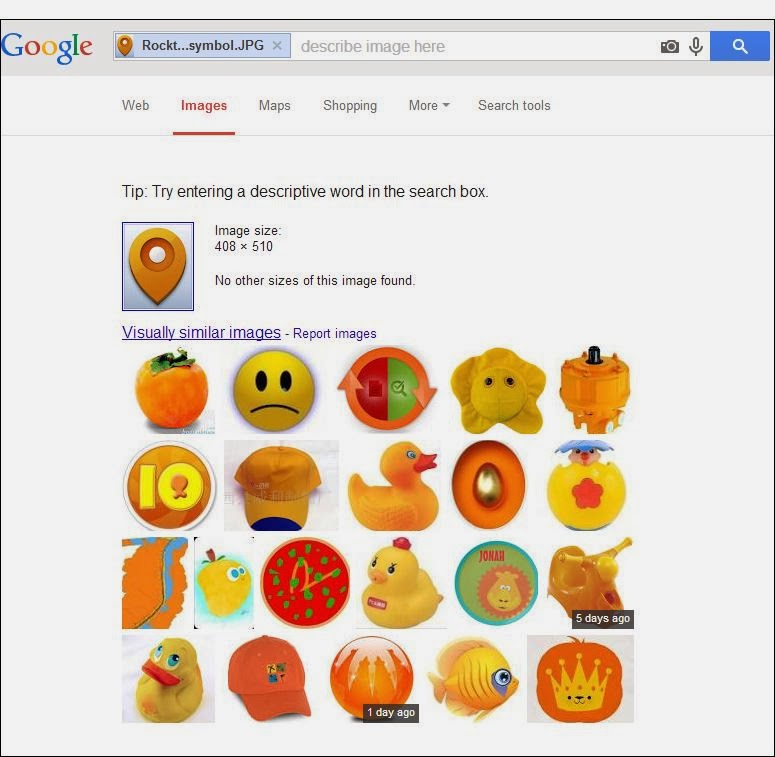
Google interprets the image content and returns visually similar images
Drag an image into an image search and Google interprets the image content

Some images are more easily interpreted than others and Google will return webpages with a similar image; it may be the same image but the size differs on different webpages, such as the Keytek Locksmith Engineer image below.

Google image search interprets image content
Google improves image search and interprets image content to match to web pages with similar images

Impressively, Google Image search is able to match some image content quite accurately. The Southern Contracts News article image example below was interpreted as a UK Map.

Google Image Search matched the UK map image
Google can interpret and match some images quite well

Google is increasingly improving how it clusters multiple images, how it identifies duplicate images, determines which image makes the most sense. Image ranking is performed on many signals but giving the search engines as much detail as possible about the image is certainly worthwhile; each image is an important link back to the website hosting that image.

Image Optimisation Developments
The value associated with image optimisation and geo-locating images is always changing. In 2012 we were trying to get our clients to seriously think about image optimisation and how to use tools like Picasa to manage their images; now it seems very natural for businesses to embrace image optimisation.

Give us a call if you want to discuss our approach to image optimisation, prioritising the best image for image search via responsive design, image-specific tags for image sitemaps in webmaster tools, image scaling for apps, adaptive images, cross-browser, using CSS, appropriate image file sizes for your requesting devices, schema.org image markup, rich snippets, geo-targeting, image search reporting in analytics, accurate image resolution for smartphones or any other consideration you may have for using images to increase web traffic.

Author: Fiona Anderson

Friday, December 20, 2013

Digital Transformation 2014


Words that best describe important business developments at Rocktime

The Rocktime Team and Rocktime Clients have compiled an informed group of words that best describe our perceptions about important business developments currently affecting us in 2013 and that will continue to have a direct impact on us going optimistically into 2014.


  • Innovation
  • Responsive design
  • Social ROI
  • Digital Transformation
  • Conversions
  • Social Workplace
  • Mobile
We have some really great clients and we appreciate the challenges to remain innovative.

You know where we are if you want to chat about your marketing and development plans; we are all 'hands on' and 'consultants', so you are in good hands, whoever you work with at Rocktime!

Here's to plenty more great integrated digital strategies in 2014!

Author: Fiona Anderson

Friday, November 29, 2013

Team Event: Aim Direct Target - Clay Pigeon Shooting


Image credit rjwhetton.co.uk

Clay pigeon shooting, also known as clay target shooting, and formally known as Inanimate Bird Shooting, is the art of shooting a firearm at special flying targets, known as clay pigeons or clay targets...well that is the definition, the reality was less of an art and more of an attempt..
We all managed to hit the target, largely thanks to the impressive and cheeky training skills of Ralph at Challenge Leisure.

Robert Whetton Photographer is the RocktimeSocial Guest Blogger this month and joined us on our Team Event to capture our endeavours...we are certainly in no position to give Rob any tips on shooting; guns or cameras.
Check out his event photos and blog and on the Robert Whetton Photographer Facebook Page.

rjwhetton guest blog and images form the Rocktime team clay shoot


The weather was fresh and clear, the team all learnt a lot and had a great laugh; mostly at each other in a lighthearted banter because Ralph was such a funny, ex-army tell-em-straight kind of guy, which the team photos also clearly show!


rjwhetton blog images

Well done to Paul, Krishna and Guy for being our champion clay shooting team. Paul was not only team winner, solo winner but also our photographer in residence! Busy man!


winner prize and medal went to Paul


Would we go again...very likely, especially, as we have already been challenged by another digital agency.

It has been a good year for Rocktime social activities:Bowling, Paint Balling, Go Ape Tree top Adventure, RIB speed boat ride and the ever popular pint at the pub with a game of pool.

Author: Fiona Anderson

Monday, October 28, 2013

Useful Introduction to Google Analytics Custom Reports

Analytics custom reports

A custom report is a report that you create in Google Analytics. Custom Reports can be incredible time savers if you have the right ones. Instead of spending time digging around for important metrics, you can find what you need separated neatly into columns for some analysis that will lead to some actionable insight.

You manage your existing custom reports from the Custom Reports Overview page. Click the Customisation tab, and then click Overview in the left navigation.

Create your own custom reports

To create a custom report, click the Customisation tab and then click Overview under Custom Reports in the left navigation. Click + New Custom Report to create a new report.

To build a custom report, you'll need to specify at least one dimension and one metric. Dimensions are ways of describing visits, visitors, pages, products and events.

You pick the dimensions (Visitor Type, for example) and metrics (quantifiable - Visits, Bounce Rate and Goal Conversion Rate, for example) and decide how they should be displayed.

You can also apply filters for each custom report to narrow down your findings.

If you would like a “how to” guide that shows you how to create one, Google Analytics help section explains how you can create a “Custom Report” in Analytics.

Download custom reports

You can also download already created custom reports. Below I have listed a couple of custom SEO reports we mostly use.

If you're signed in to the Google Analytics account of your choosing, you can click on the links below. They will be automatically saved into your Analytics account and can easily be found in the custom reports section inside your profile.

·         Customer Behaviour

·         Referring Pages

·         Link Analysis

·         Conversions

·         Top Converting Landing Pages

Moreover, you can also visit Google Analytics solutions gallery and filter custom reports to download based on your business objectives and marketing function.

Save time and contact us 

Google Custom Reports ultimately save you a lot of time and help you make actionable decisions that will help you improve your website's performance. If you would like to take advantage of the Google Analytics Custom Reports to pull out very valuable and actionable search marketing insights, but are finding it difficult to understand how to measure your KPIs effectively, feel free to give our Sales team a call to see how we can help. 

Author: Aysegul Yigitbasi

Monday, October 14, 2013

Geek Video of the Month


Celluon Magic Cube has been chosen as 'Geek Video of the Month'.  We like the product and the video is a good example of what a product video should deliver: facts, facts and more facts. 
The Celluon Magic Cube is a full-size laser projection keyboard and touchpad which connects to any BlueTooth HID device and is small enough to fit in your pocket.  The virtual keyboard is made possible through the incorporation of the 3D Electronic Perception Technology (EPT).  EPT enables everyday devices to “see” the world around them, so that they can perceive and interact with it.  

EPT systems send out pulses of light and then time how long it takes for the reflection to return to the sensor, this enables the system to determine depth.   The uses of this technology are vast, Celluon give an overview of possibilities for future applications of EPT and how the Celluon Magic Cube works.
Celluon’s strapline is: “A World Of Possibilities At Your Fingertips”. Great work!  Looking forward to hearing about your future applications using EPT, maybe in automating manufacturing processes or transportation.